



Key Takeaways
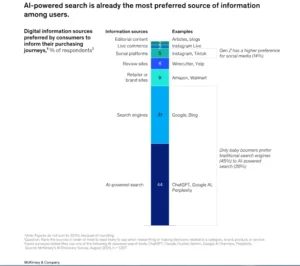
- Half of customers now use AI search to make buying decisions. If your client’s business is not in that answer, it doesn’t exist for that buyer. No impression, no click, no chance to convert.
- SEO tells you how a business ranks. Riva tells you whether AI understands your brand well enough to recommend it.
- An AI visibility check cuts through the guesswork. It shows exactly how AI tools classify a business, where the gaps are, and who’s showing up instead.
- AI visibility audits are repeatable and billable. Run it once, build the workflow, scale it across every account.
If you have recently typed your client’s business name into ChatGPT and received a vague, incomplete, or outright wrong description, you have already run into an AI visibility problem.
Your client just asked you a question: “Why does our competitor show up when I ask ChatGPT for recommendations, but we don’t?”
It is an AI visibility problem, and traditional SEO tools weren’t designed to diagnose it.
This is exactly what Riva was built for. As an AI visibility platform, Riva shows how AI tools interpret and surface a business and its offerings compared to competitors in AI-powered search. If you run an agency, it gives you a structured way to audit every client’s AI presence, identify gaps, and fix them with data to back up every recommendation.
This blog walks you through the relevant steps on how to run a full AI visibility check for your clients using Riva.
Why AI Visibility Is Now an Agency Responsibility
Search behaviour is changing. More buyers are turning to AI tools like ChatGPT, Gemini, and Perplexity to research products and make shortlists before they ever click on a website. According to a McKinsey & Company report, $750B of consumer spend will flow through AI-powered search by 2028. (New front door to the internet: Winning in the age of AI search, 2025)
These tools do not serve rankings, but they do generate answers. And the businesses that appear in those answers are the ones whose information is clear and well-structured enough for AI to understand and cite with confidence.
Steps for AI Visibility Check Using Riva
Traditional SEO measures rankings and traffic. Riva diagnoses something upstream: does AI actually understand this business, and is it surfacing it in the right conversations? This distinction is what makes Riva a complement to your existing SEO stack.
Let’s run the check.
Step 1: Set Up Your Client’s Project in Riva
Log in to your XOVI dashboard and navigate to the Riva visibility tool. If you are running this for a client, create a new project under their domain.
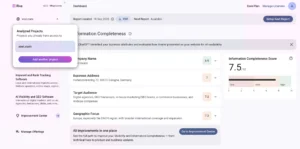
Enter the business exactly as it appears publicly: the name your client uses on their website, primary market, geographic region you want to focus on, and key directories.
Once you add the new project and opt for the AI visibility score check, Riva does the rest.
Step 2: Run the Access Check
The first thing Riva checks is access: can AI crawlers technically read the site at all?
This sounds basic, but it trips up a surprising number of businesses. If AI crawlers are blocked by robots.txt or by JavaScript-heavy pages that don’t render cleanly, AI cannot index the content needed to understand the business. No crawl, no understanding, no recommendation.
What to look for? Any flagged restrictions that block AI crawlers specifically. This is different from standard SEO crawl issues
Step 3: Review the AI Understanding Analysis
This is the core diagnostic. Riva queries AI assistants and analyses how they classify and describe your client’s business.
The Understanding analysis reveals three things:
Categorization: Is it describing the right industry, service type, and target customer? A web design agency described as a “website builder tool” has a visibility problem. It means the business is competing in the wrong category inside AI answers.
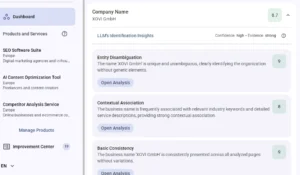
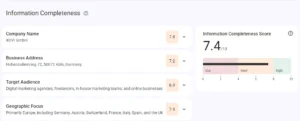
Missing information: AI tools can only recommend what they understand. If key services, specialisations, locations, or differentiators are not in the picture, they won’t be mentioned. Riva surfaces these gaps explicitly.
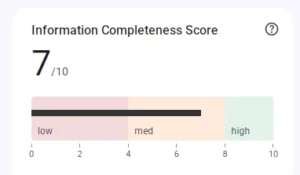
Conflicting information: If your client’s address, phone number, or service description differs across sources, AI tools form a muddled picture. That inconsistency directly reduces recommendation confidence.
Step 4: Run the Competitor Benchmark
Now you know how AI understands your client’s business. The next step is to find out who is showing up instead of them and why.
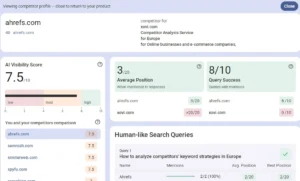
The Competitor Benchmark section in Riva shows which competing businesses appear in AI answers for relevant prompts in your client’s category. It identifies the competitors’ specific prompts where they appear, and what those competitors are doing differently in terms of content clarity and information consistency.
This is powerful for two reasons:
- First, it shifts the conversation from abstract “your AI visibility could be better” to specific “ChatGPT is recommending Competitor X instead of you for these exact queries”. Clients respond to that.
- Second, it gives you a concrete benchmark: you can show the gap and track it closing over time.
Step 5: Check the AI Visibility Score
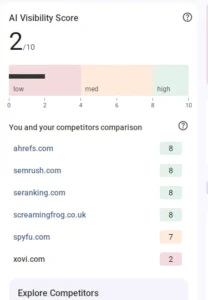
Riva assigns each business an AI Visibility Score. It is a single, trackable metric that reflects how well AI tools understand and surface the business overall.
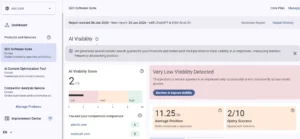
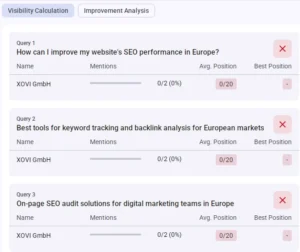
Riva breaks this down by intent category — the distinct types of queries users actually ask AI tools when they are in-market for what your client offers. For a SaaS client, that might look like “best project management tool” or “alternatives to HubSpot”.
For a local business, it could be “best dentist near me” or “emergency plumber in Cologne”. Each category gets its own set of metrics, scoped to how your specific client shows up in it.
For each category, you will see:
Visibility Score: How prominently the business appears in AI-generated answers for queries in that category. This is your headline metric per segment.
Average Position: where the business tends to appear when it is mentioned. First appearance in an AI answer carries more weight than a passing reference three paragraphs later.
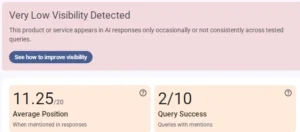
Query Success: Scored out of 10, this shows how many of the tested queries actually returned a mention of the client’s business. That’s the number that tends to land hardest with clients. It makes the gap concrete.
Step 6: Work Through the Improvement Centre
The Improvement Centre provides you with actionable solutions. Riva generates a prioritised list of recommendations based on everything it found in the check.
For instance, if Riva finds inconsistent business descriptions across directories, it flags this as a high-priority fix and identifies which sources need updating.
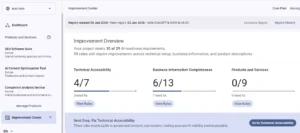
Recommendations are ranked by impact. You do not need to guess which fixes to tackle first. They cover areas including content gaps to address on the site and schema that help AI tools categorise the business correctly.
Step 7: Set Up Scheduled Monitoring
A one-off audit is useful. But AI visibility changes. New competitors enter the picture. AI tools update how they classify businesses.
Scheduled monitoring in Riva tracks your client’s AI Visibility Score and key metrics over time, so you are not doing manual spot-checks or guessing whether improvements are sticking.
Step 8: Export the White-Label Report
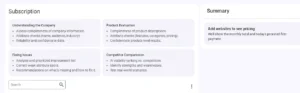
Once you have completed the audit and have your findings in order, Riva lets you export a white-label report ready to share with your client.
The report gives clients a clear view of their AI visibility score over time with your agency’s branding. The before-and-after data make a monthly retainer straightforward to justify.
Find Out How AI Sees Your Clients
Right now, most of your clients don’t know how ChatGPT, Gemini, or Perplexity describe their business, what category they are filed under, what’s missing, or who’s getting recommended instead. Their competitors don’t know either. That’s not a gap you find by guessing. It’s a gap you find by checking.
Riva gives you a structured, repeatable way to audit AI visibility, fix what is holding clients back, and prove the impact over time.
Next time a client asks why ChatGPT recommends someone else, be ready with an answer. Run your AI visibility check today with Riva!
Frequently Asked Questions
How is Riva different from regular SEO tools?
An AI visibility score measures how well AI tools understand and surface a business in response to relevant queries. It is calculated using parameters like crawler access, consistency across sources, and the number of times a business appears in AI answers compared to competitors.
What is an AI visibility score?
An AI visibility score measures how well AI tools understand and surface a business in response to relevant queries. It is calculated using parameters like crawler access, consistency across sources, and the number of times a business appears in AI answers compared to competitors.
Does improving AI visibility affect Google SEO performance?
Yes. Many of the fixes Riva recommends, such as cleaning up inconsistent business information, also benefit traditional SEO. These are basically two channels that share an overlap in the underlying content work, but answer different visibility questions.
How do I get my client's business to show up in ChatGPT recommendations?
ChatGPT only recommends businesses it understands clearly. This means consistent business information across the web, content that answers real buyer questions, and structured data that helps AI categorise the business correctly.
How often should you run an AI visibility audit for a client?
Run a full audit at the start of an engagement to set the baseline. After that, you can opt for a monthly check to cover the majority of accounts. AI visibility shifts more slowly than rankings, but it does shift. Hence, run an unscheduled audit any time a client rebrands or changes their service offering.