



Key Takeaways
- Competitor analysis tells you where traffic is going and why. Rankings, backlinks, content, and paid strategy all leave data trails that your client’s SEO plan could use.
- XOVI consolidates the entire analysis in one platform. No switching between tools to cross-reference keyword, backlink, and visibility data.
- XOVI offers features like the Keywords Tool, OVI, Links Tool with Hubfinder, Rank Tracker, SEA Tool, On-Page Text Optimization, and white-label Reporting that feed directly into the process.
- XOVI’s Ranking Value quantifies the commercial worth of every keyword gap, and Hubfinder surfaces outreach targets no manual search would find.
Your client’s competitor just moved from position 8 to position 2 on their most valuable keyword. Six positions in one update means a content decision or a link pattern you have not spotted yet.
This is exactly where competitor analysis earns its place. It tells you what competing domains rank for, where their links come from, and how their content is structured. It helps you identify gaps and act on them before they widen further. When done right, competitor analysis becomes a data-backed action list.
This blog walks you through the key steps on how to conduct a thorough competitor analysis using XOVI.
Why Run This in XOVI?
XOVI keeps keyword comparison, OVI visibility scoring, backlink analysis, rank tracking, and client reporting inside a single platform.
For agency workflows, that matters: less context-switching, faster analysis, and client reports that do not require stitching together exports from three tools. Doing this across SEMrush, Ahrefs, and a reporting tool takes hours. In XOVI, it’s one workflow. And as everything stays in one platform, your report can pull live data without any manual exports.
Here is a step-by-step guide on competitor analysis using XOVI.
Step 1: Identify Real Competitors Using the Keywords Tool
Start inside your client’s project and open the Keywords Tool. Enter your client’s domain to pull their current keyword rankings, then switch to the Ranking Comparison view to see which other domains are appearing for the same terms.
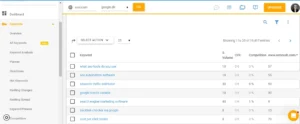
XOVI shows you who’s actually competing for the same search real estate. Pick the top three to five domains that consistently appear across your client’s most important terms. These are your working competitors.
Step 2: Analyze Keyword Rankings Side by Side
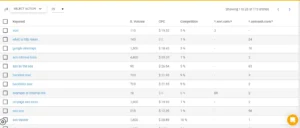
In the Keywords Tool, go to Keywords > All Keywords and enter a competitor domain. You get every keyword they rank for with search volume, CPC, competitor density, and position.
Ranking Value: XOVI assigns a monetary value to each keyword based on position, search volume, and CPC. Sort by Ranking Value to identify which terms are commercially valuable to your competitor. These are the gaps worth focusing on.
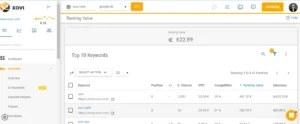
Long tail vs. short tail: Apply the Word count filter to separate single-word short tail from multi-word long tail terms. Long tail keywords convert better and are easier to win. A competitor ranking well for long-tail terms that your client ignores is a direct content gap.
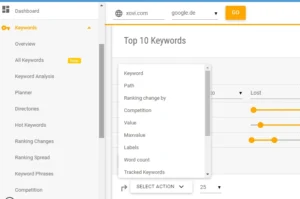
Keyword comparison: In Ranking Comparison, XOVI shows keywords both domains share, CPC, and position differences. Export the competitor-exclusive list filtered to 500+ monthly search volume. That becomes your content brief.
Step 3: Read Competitive Direction with the OVI
The OVI is XOVI’s weighted visibility score. It is a combination of ranking positions with search volume across all tracked keywords, updated weekly.
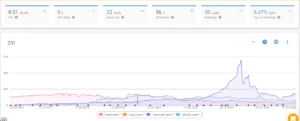
Pull a 90-day trend for your client and top competitors. A competitor whose OVI climbed 15% in 60 days is actively building content, links, or both. Falling OVI for a competitor is your window to take their rankings.
Screenshot the OVI comparison chart. It is the clearest single visual for any client report.
Step 4: Find Backlink Gaps in the Links Tool
Open the Links Tool and enter a competitor domain. You get referring domains, anchor text distribution, and the Backlinks Trend chart. A steep 30-day climb means active building, a sudden drop signals a penalty or disavowal.
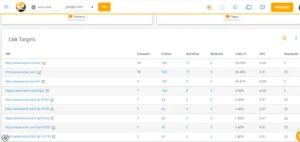
Then use Domain Comparison or Hubfinder inside the Links Tool. Domain Comparison gives you a side-by-side view of two link profiles. On the other hand, Hubfinder finds domains linking to multiple competitors simultaneously, making them your highest-priority outreach targets.
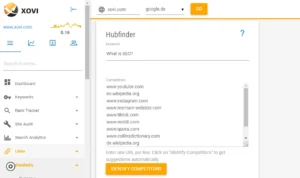
Pro Tip: Sites already linking to similar businesses in your niche are the easiest outreach sell.
Step 5: Check Competitor Paid Strategy in the SEA Tool
Open XOVI’s SEA Tool and enter a competitor domain.
SEA > Booked Keywords shows every term they are bidding on
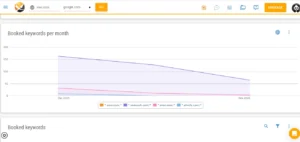
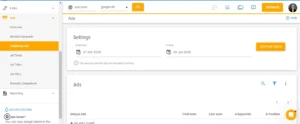
SEA > Published Ads gives you full ad copy — headline, description, URL, and current position. Keywords that a competitor pays for are commercially validated. That’s intent data you can feed directly into content planning.
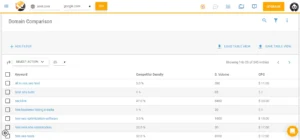
SEA > Domain Comparison helps you find terms the competitor bids on that your client doesn’t. These are organic content gaps backed by paid proof of value.
Step 6: Audit On-Page with Text Optimization
For deeper analysis, start with On-Page > Text Optimization (WDF*IDF). Enter your target keyword and the competitor URL. XOVI shows which semantically related terms the top-ranking page covers that your client’s content misses.
This is the gap that actually explains a ranking difference. Two pages can both be optimized for a keyword, and only one of them covers the terms Google expects to see around it.
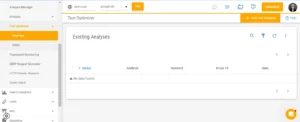
Once you know what’s missing, check how it’s built. Go to On-Page > Analysis and run it against the same competitor URLs. You will get content structure, heading usage, and other on-page signals. This provides you with useful context for how to add the missing terms, not just that you need to.
Step 7: Deliver It All in the Reporting Tool
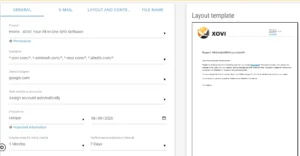
Build the client-facing deliverable in XOVI’s Reporting Tool. Apply agency and client branding. Pull in the –
- OVI trend chart
- keyword comparison with Ranking Value data
- Backlink gap table from Domain Comparison or Hubfinder
- Rank Tracker movement
- SEA intelligence
A competitor keyword your client just overtook, with 2,400 monthly searches and a $4.20 CPC, is worth roughly $10,080/month in avoided ad spend.
2,400 clicks × $4.20 CPC ≈ $10,080/month (assuming full click-through at that search volume)
Put that number in the report. That is what clients remember between invoices.
Add a short executive summary: what changed, what it means, and what is next. Schedule monthly. That report is what converts a project into a retainer.
Don’t Wait Till Q4 to Catch a 6-Position Jump
Most agencies run competitor analysis once a quarter. That’s too slow. Rankings shift after every update, and competitors get sharper on content and links. Build a rhythm instead: check Rank Tracker daily, review OVI and Backlink Trend monthly, and reserve the full audit for quarterly resets.
Agencies that track competitors’ actions in real time can pivot quickly, protect rankings, and show clients concrete evidence that the gap is closing. XOVI gives you every tool to run this analysis inside one platform and a white-label report to prove it.
Set up your first competitor analysis project in XOVI and get the analysis ready before your next client call.
Frequently Asked Questions
How do I find a client's true search competitors in XOVI?
Use Ranking Comparison in XOVI’s Keywords Tool. Enter your client’s domain and see which other domains consistently rank for the same terms. These are your actual search competitors.
What is Ranking Value, and why does it matter for agency reporting?
Ranking Value is a monetary figure XOVI calculates per keyword using position, search volume, and CPC. This accounts for roughly what that traffic would cost in Google Ads. It frames SEO results in commercial terms, making it easy to show clients the business value of a ranking gain.
What's the difference between Domain Comparison and Hubfinder in the Links Tool?
Domain Comparison gives a side-by-side link profile view between your client and one competitor. Whereas, Hubfinder identifies a domain linking to multiple competitors. It is a quick route to high-priority outreach targets.
Can I use XOVI to track how a competitor recovers after a Google algorithm update?
Yes, pull the competitor’s OVI trend in XOVI and overlay it against the update date. If their visibility dropped and is now climbing back, check what changed using On-Page > Analysis. That recovery pattern tells you exactly what Google rewarded and gives your client a tested playbook to follow.
How often should agencies run a full competitor analysis?
You must run competitor analysis on a monthly basis for structured reviews. The Rank Tracker updates daily, so you catch ranking shifts in real time. Fast-moving verticals may need a fortnightly OVI and link velocity check after a Google algorithm update.