




Key Takeaways
- White-label reporting is a retention tool. Clients who clearly see the value you deliver don’t churn
- XOVI combines rank tracking, audits, backlinks, and third-party analytics into one branded report to avoid juggling between multiple tools
- Automated delivery means your reports go out on schedule, every time, without adding to your workload
- Reusable layout and content templates let you onboard new clients in under 15 minutes. This makes your reporting workflow scale without scaling your overhead
- You can grant clients direct read-only access to their XOVI project data. This provides clients with a cleaner alternative to back-and-forth emails
Most clients do not care about crawl depth or keyword cannibalization. They care about one thing: whether what we are paying for is actually working. Your job is to answer that question clearly and in a format that makes you look like the expert you are.
White-label SEO reporting is how agencies do exactly that. It means delivering fully branded SEO performance reports without any third-party tool fingerprints. Clients see results tied to your agency. It also solves pain points like manually assembling data from five different tools every month or sending generic exports that mean nothing to a non-technical decision-maker.
And with XOVI’s white-label reporting, you can access a fully branded, data-rich report that shows real business results, sent automatically, on your schedule.
This blog walks you through a step-by-step process for using XOVI’s white-label reporting to build custom branding and strengthen client trust.
What Is White-Label SEO Reporting?
White-label SEO reporting is the practice of presenting SEO performance data under your own agency’s brand, rather than under the name of the tool that generated it. The data itself may come from a platform like XOVI, but the client only ever sees your logo and your voice.
Traditionally, pulling that data together and dressing it up in your branding was a manual job. XOVI removes that manual layer by automating the entire process, from pulling live data to applying your saved branding to sending the report on schedule. Here’s how the two approaches compare:
Manual Reporting vs. XOVI Automated Reporting
| Feature | Manual Reporting | XOVI Automated Reporting |
| Data sources | Pulled individually from separate tools and spreadsheets | Combined automatically from rank tracking, audits, backlinks, and connected analytics |
| Formatting | Rebuilt by hand for every client, every month | Set as a template for every report |
| Branding | Inconsistent | Applied automatically to every report from a saved layout |
| Delivery | Manually exported and emailed on an ad hoc basis | Scheduled to send automatically on a set day, weekly or monthly |
Manual reporting works when you have two or three clients. It stops working the moment your agency grows. Automated reporting removes that bottleneck. It keeps your branding consistent across every client, and frees up the time you need to scale your client base without scaling your workload.
Why White-Label SEO Reporting Matters for Agencies
Let’s be clear about one thing – generic reports erode trust. When a client gets a report that looks like it was auto-exported from a tool and forwarded without review, they start questioning what they are actually paying for.
White-label reporting flips that. Every report your client opens looks like your branding and your structure. The underlying data is XOVI’s, but the professional presentation is yours. That’s the margin that retains clients. According to Business Dasher, overall profit increases by 25 to 95% for every 5% increase in client retention.
Key Steps to Build a White Label SEO Report in XOVI
XOVI lets you create unlimited white-label reports across all your client projects with high-end customization and automation. Here’s how to build them seamlessly:
Step 1: Connect Your Data Sources
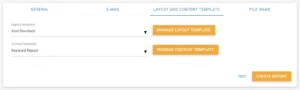
Before you touch the report builder, make sure XOVI is pulling from the right places. XOVI’s Reporting Tool can combine data from across the entire XOVI Suite alongside third-party sources. For instance –
- Rank tracking
- Backlink analysis
- Keyword data
- Google Analytics
- Google Search Console
- Matomo
Go to your project settings and link the relevant analytics integrations. This is foundational. A report is only as useful as the data feeding it. When you have rank movement, organic traffic, and Search Console impressions in one place, you are not making clients cross-reference 3 different dashboards themselves.
Once your integrations are live, every data point becomes available to pull into any report you build.
Step 2: Set Up Your White-Label Layout
Head to the Reporting Tool and start with the layout. This is where your agency branding comes alive.
XOVI gives you control over the full visual structure of every report:

- Logo and brand identity: Upload your agency logo (or your client’s logo if you are white-labeling for them directly). This appears in the report header and sets the visual tone from the start.
- Color schemes: Define the colors used in charts and performance indicators. Match your client’s brand palette, or use your agency’s colors. The goal is a report that feels purpose-built.
- Headers and footers: Customize what appears at the top and bottom of every page.
- Personalized salutation: When a report is automatically emailed, XOVI lets you write a custom salutation so the email doesn’t read like a system notification.
Once you configure a layout, save it as a Layout Template. The next time you onboard a new client, you can start using the template in under two minutes.
Step 3: Choose Your Content Modules
While layout handles how a report looks, content focuses on what’s in it. XOVI takes care of both aspects.
You can build reports around pre-designed content templates or curate your own from the XOVI Suite data available to you. The main content areas to know are:
Rank Tracker Data: Show clients exactly where their target keywords sit in Google and Bing, with daily or weekly rank movement. XOVI tracks rankings across 197 countries. So if your client has international exposure, you can report on it precisely.
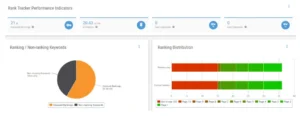
OVI (Online Value Index): Provide clients with a single number that indicates whether their organic visibility is growing or declining. XOVI’s proprietary visibility metric provides clients with a consolidated view of how their domain is performing in organic search.
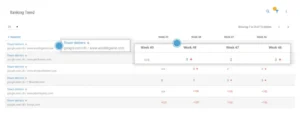
Backlink data: Demonstrate that link building is actually happening. The Links Tool provides referring domain counts, new and lost backlink counts, and disavow analysis.
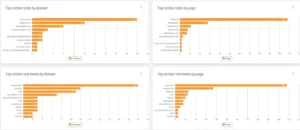
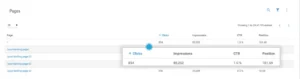
Search Analytics: Connect SEO activity directly to traffic outcomes. Pull in top-performing landing pages, organic clicks, and CTR data from Google Search Console or Google Analytics.
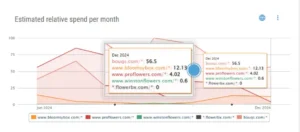
SEA data: If you are managing paid campaigns alongside SEO, use the XOVI SEA Tool to combine both in one report. Clients get a complete picture of search performance without having to cross-reference two separate documents.
Step 4: Personalize the Report for Each Client
Personalization is what makes clients feel looked after.
For each client report, write a brief introductory text that contextualizes the data, like
- What happened this month?
- Did rankings improve after the content update?
- Did a technical fix resolve the crawl errors flagged last quarter?
XOVI lets you add custom text modules directly into the report. This is a five-minute step that makes the difference between a report a client files away unread and one they actually respond to.
What not to include: A local SMB client does not need to see Yandex rankings or international OVI trends. A SaaS client running technical SEO campaigns does not need a simplified overview; they want the granular keyword and audit data. XOVI lets you build different Content Templates for different client types.
Step 5: Automate Delivery
Once a client base reaches ten or more projects, assembling and sending individual PDFs every month becomes a genuine operational cost.
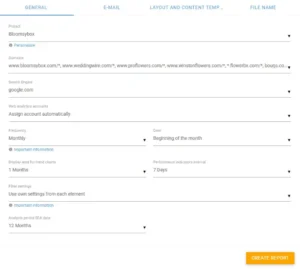
XOVI’s automated reporting eases the process.
Once your layout and content are configured and your report is saved, set the delivery schedule: weekly or monthly. Add the recipient email addresses. XOVI handles the rest. The data refreshes automatically; XOVI generates the report and delivers it to the right inboxes on the right date.
You can also download reports as PDF files at any time for presentations or quarterly business reviews.
Note: XOVI also allows you to grant clients read-only access to the XOVI Suite, so they can log in and view their project data directly. For clients who want more transparency, this is a cleaner option than fielding questions about how the data was pulled.
What Good White-Label SEO Reporting Actually Proves
Clients who receive vague, hard-to-interpret data start to wonder whether the engagement is worth continuing. However, when clients understand the value they are getting, churn rates go down. This means client reporting is an efficient retention tool.
XOVI’s reporting is built to close that gap. The data comes from the same platform you use for your work: rank tracking, audits, backlinks, and content performance. The reporting layer takes that data, puts it in your agency’s visual identity, and delivers it automatically.
Results? A reporting workflow that scales with your client base without scaling your overhead.
If you are still facing challenges extracting and combining client reports from multiple tools, try XOVI. It tracks, audits, and reports everything under one roof, at a price point that works for agencies not running enterprise budgets.
Ready to set up your first white-label SEO report? Start with a free trial today!
Frequently Asked Questions
Can I add my own branding to XOVI white-label SEO reports?
Yes, XOVI’s white-label reporting lets you upload your agency logo and set custom color schemes. Every report your client receives looks as if it came directly from your agency, not from any third-party tool.
Can XOVI reports be sent automatically to clients?
Yes, once you configure your report, you can set a weekly or monthly delivery schedule and add client email addresses. XOVI automatically generates and sends the report, eliminating the need for additional manual uploads.
Is XOVI white-label reporting good for agencies managing multiple clients?
Yes, XOVI supports unlimited projects across all plans. This makes it a practical choice for agencies managing multiple clients without rebuilding workflows from scratch.